| Support Category: ILT | Drop, VILT | Drop (select applicable) |
| Specialist Notes: |
Users can withdraw from a session using these instructions. If the withdraw option is not available, (regardless of the status) please create a ticket.
| Standard Response: |
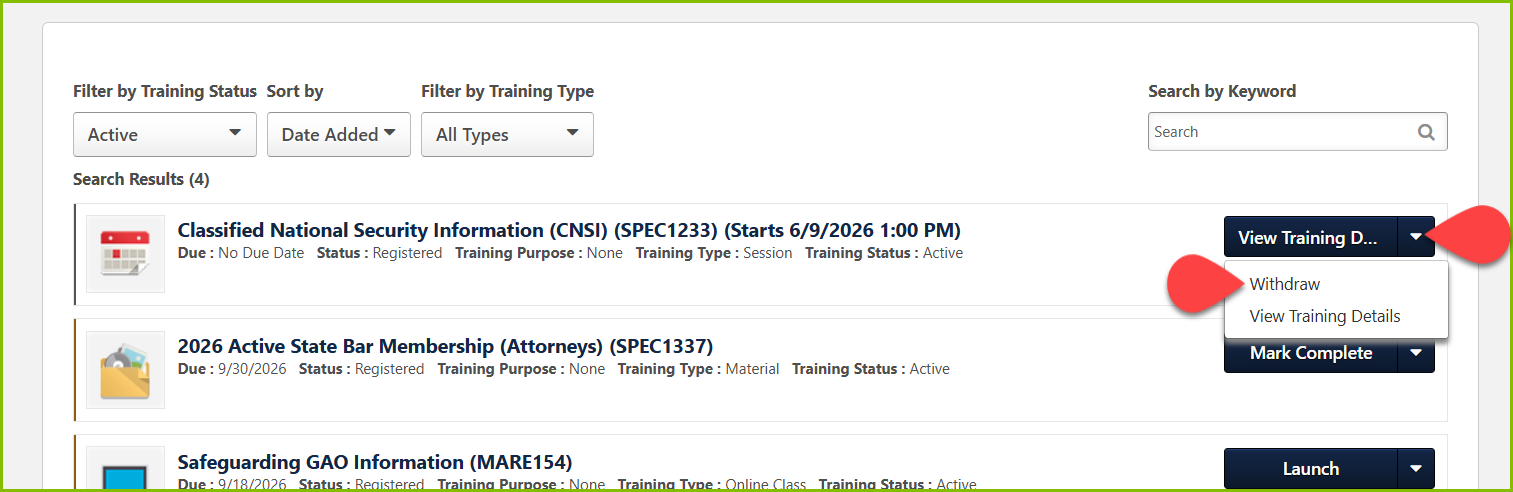
To withdraw from a session, you may use the following steps:
1. Navigate to your active transcript and locate the training.
2. Click the downward-facing arrow, then select Withdraw from the drop-down menu – see image below.
If you do not have the option to withdraw, please let us know and we’d be happy escalate an inquiry to the administrators for further assistance.
